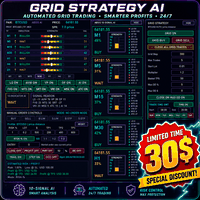
Aegis QuadFlow AI Trader
Aegis QuadFlow AI Trader is a semi-automated Expert Advisor for MetaTrader 5 that combines multi-timeframe market analysis, manual trade execution, automated position management and grid basket control in one professional trading interface.
The EA uses a centralized rule-based AI engine to analyze ten technical components across multiple timeframes and generate one of five market recommendations:
- WAIT
- SELL
- STRONG SELL
- BUY
- STRONG BUY
Ten-Indicator AI Engine
The analysis engine continuously evaluates the following ten components:
- Liquidity Sweep — LS Detects potential bullish and bearish liquidity sweeps around previous market highs and lows.
- Anchored VWAP — AVW Evaluates the position of price relative to an anchored volume-weighted average price.
- Volume Profile — VP Calculates the volume distribution and Point of Control within the selected historical range.
- Order Flow Pressure — OF Estimates bullish and bearish pressure using candle structure, closing position and available volume data.
- Fair Value Gap — FVG Detects active bullish and bearish market imbalances.
- Market Trend Strength — MTS Measures trend direction and momentum using moving-average alignment, slope and price structure.
- Support and Resistance Tool — SRT Identifies nearby support and resistance levels and evaluates market reactions or breakout conditions.
- Volume and RSI Intelligence — VRI Combines momentum and volume behavior to detect changes in buying and selling pressure.
- Market Structure Engine — MSE Detects bullish and bearish market-structure breaks.
- Adaptive Trend Confirmation — ATC Provides additional trend confirmation using moving-average alignment, momentum and price positioning.
The AI engine combines the ten signals using configurable weights, alignment requirements and conflict control. Strong recommendations require broader agreement between the indicators and confirmation from multiple timeframes.
Multi-Timeframe Analysis
The EA analyzes the following timeframes:
Each timeframe displays its current direction, individual indicator results, signal strength and AI recommendation.
The final recommendation is calculated from the combined multi-timeframe analysis. Higher timeframes can receive additional weighting to reduce the influence of short-term market noise.
Daily Mimic Panel
The Daily Mimic Panel provides a clear overview of the current market condition and EA status.
The panel displays:
- Multi-timeframe AI recommendation
- Individual indicator results
- Bullish and bearish alignment
- Signal confidence
- Current spread
- Selected trading mode
- Position and risk information
- Active trade-management functions
- Grid basket information
- Daily trading statistics
The panel is designed to provide the main analytical and trading information without requiring multiple separate indicators.
Indicator Chart Switches
Each of the ten indicators has an individual ON/OFF switch inside the Mimic Panel:
- LS
- AVW
- VP
- OF
- FVG
- MTS
- SRT
- VRI
- MSE
- ATC
All indicator switches are enabled by default.
The switches control whether the related indicator is displayed on the chart. The centralized AI engine can continue calculating all ten indicators even when individual chart visuals are hidden.
Available chart visuals include:
- Liquidity-sweep markers
- Anchored VWAP line
- Volume-profile histogram
- Point of Control line
- Order-flow pressure markers
- Fair Value Gap zones
- Fast and slow trend lines
- Support and resistance levels
- Momentum-pressure markers
- Market-structure break markers
- Adaptive trend-confirmation ribbon
Manual Trading Panel
The EA provides direct chart-based execution for:
- Market Buy
- Market Sell
- Buy Limit
- Sell Limit
- Buy Stop
- Sell Stop
The user can configure the entry price, Stop Loss, Take Profit and trade volume directly from the panel.
Position-Sizing Modes
Two position-sizing methods are available:
- Fixed lot size
- Risk-percentage calculation
When risk-percentage mode is selected, the EA calculates the approximate trading volume using the selected account value, Stop Loss distance and risk percentage.
The final volume is normalized according to the broker’s minimum lot, maximum lot and volume-step requirements.
Stop Loss and Take Profit Management
The EA supports:
- Configurable Stop Loss
- Three Take Profit levels
- Risk-to-reward presets
- Break-even management
- Partial position closure
- Trailing Stop
- Step-based Stop Loss management
- Symbol-specific distance settings
When the account and symbol specifications allow it, the total position volume can be divided between several Take Profit levels.
A hedging account is recommended when separate positions with different Take Profit levels are required.
Position-Management Controls
The trading panel includes functions for:
- Closing all managed positions
- Closing profitable positions
- Partial closing
- Moving Stop Loss to break-even
- Activating Trailing Stop
- Activating step-based protection
- Managing pending orders
- Managing OCO orders
Positions are managed according to the selected symbol and Magic Number.
OCO Pending Orders
The EA includes One-Cancels-the-Other pending-order functionality.
A Buy Stop and Sell Stop can be placed around the current market price. When one pending order is activated, the EA can automatically remove the opposite pending order.
Grid Basket System
Aegis QuadFlow AI Trader includes a separate grid basket-management module.
The user can start a grid basket manually using:
After the first grid position is opened, the EA can manage additional grid entries according to the configured price distance and basket settings.
Available grid controls include:
- Grid step
- Maximum number of trades
- Initial lot size
- Lot multiplier
- Basket profit target
- Maximum basket drawdown percentage
- Maximum basket drawdown value
- Daily grid-loss percentage
- Daily grid-loss value
- Basket closure at the drawdown limit
- Cooldown after basket profit closure
- Cooldown after drawdown closure
The grid panel displays:
- Current basket direction
- Number of grid positions
- Total basket volume
- Current basket profit or loss
- Next grid-entry level
- Basket profit target
- Active drawdown limit
- Estimated basket reward-to-risk relationship
Grid trading and lot multiplication can increase exposure during prolonged market movement. Conservative settings and defined drawdown limits are recommended.
Trading Schedule
The EA includes configurable trading-day and GMT time controls for grid-related trading logic.
The user can select:
- Allowed trading days
- GMT session start time
- GMT session end time
Active grid baskets can continue to be managed outside the selected entry session so that basket profit, drawdown and position-management functions remain operational.
Symbol Profiles
The EA includes predefined distance and trading profiles for several commonly traded markets, including:
- XAUUSD
- BTCUSD
- ETHUSD
- Major Forex pairs
- US30
- US100 and NAS100 variations
- US500 and SPX500 variations
- USOIL and WTI variations
Broker symbol names and contract specifications can differ. The selected profile, tick value, Stop Level, lot size and distance units should be checked before trading.
Main Features
- Centralized ten-indicator AI engine
- WAIT, SELL, STRONG SELL, BUY and STRONG BUY recommendations
- Multi-timeframe analysis from M1 to D1
- Clear Daily Mimic Panel
- Individual switches for all ten chart indicators
- Manual market and pending-order execution
- Fixed-lot and risk-percentage position sizing
- Multiple Take Profit levels
- Break-even, partial-close and trailing functions
- Step-based Stop Loss protection
- OCO pending-order management
- Manual grid basket activation
- Automated grid continuation and basket management
- Basket profit and drawdown protection
- GMT trading schedule
- Symbol-specific trading profiles
- Magic Number filtering
- No external indicators required
- No DLL required
- No external web service required
Recommended Use
The EA can be used as:
- A multi-timeframe market-analysis panel
- A manual trading assistant
- A position-management system
- A pending-order management tool
- A semi-automated grid basket manager
The default chart timeframe is M15, while the AI engine evaluates multiple timeframes independently.
Before using the EA on a live account, test the selected settings on a demo account and confirm that the distance units, lot calculation, Stop Loss, Take Profit and grid parameters are suitable for the broker and symbol.
Risk Notice
Trading financial instruments involves risk and can result in partial or complete loss of capital.
The AI recommendations generated by this Expert Advisor are analytical outputs and do not guarantee future market direction or trading results.
Volume data, spreads, candles, execution conditions and contract specifications can differ between brokers. Historical results and previous signals do not guarantee future performance.
Grid trading and lot multiplication can produce substantial drawdown. The user is responsible for selecting appropriate settings, risk limits and trading volume.